WinMPG Video Converter is an all-in-one powerful video converter, that makes it easy for you to convert almost all video formats.
As a professional video converter software, WinMPG Video Converter helps you to convert IPOD to RMVB at high speed with perfect output quality. With its user-friendly interface, this IPOD to RMVB Converter also supports batch conversion and setting relative output parameters before starting to convert IPOD to RMVB. In addition to IPOD to RMVB conversion, it can also convert between other video formats including MPEG, DVD, WMV, FLV,Youtube, MKV,PSP, 3GP, RMVB, ASF, MOV,QuickTime, TS, VOB, MP3,MP4,DivX, XviD, AVI, GIF etc.
Need no special skill, here it will show you the step-by-step guide to convert IPOD to RMVB
video formats, it is quite easy.
Download it from here : http://www.winmpg.com/down/WinMPG_VideoConvert.zip
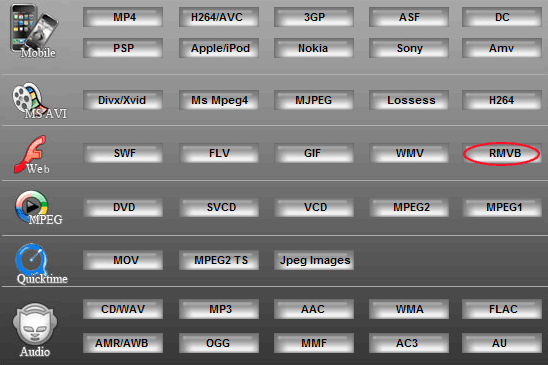
1. Please click the button"More..." on the main interface

2. Click "RMVB" to convert dialog.
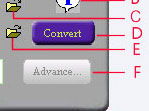
3. Convert dialog
|
A) Preview window setting
B) Help
C) Select the IPOD file
D) Convert
E) Change the path of the RMVB file
F) Advance setting(if you need,set detailed parameters for incisions,video,audio)
|
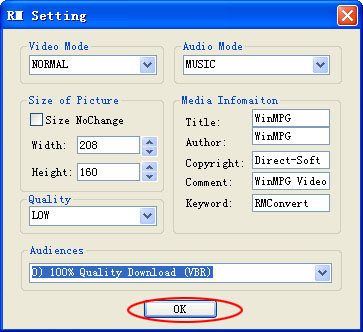
4.Click button  , then popup the setting window. Click the menu "audiences". 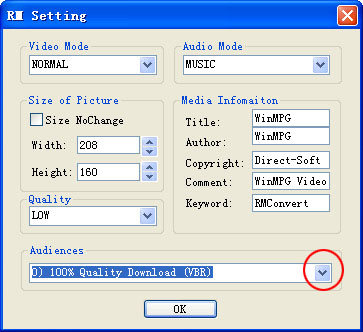
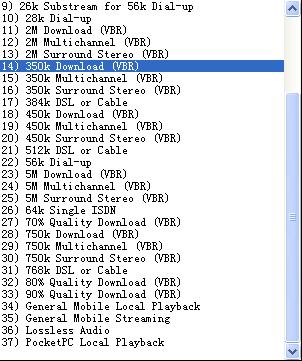
5. Select the audiences
6. Click the button"ok, start to convert IPOD to RMVB
You may also be interested in...
|